
The Ultimate Buyer's Guide to Telecalling CRM Software in India
Sales teams today don't struggle because they lack leads. They struggle because they fail to execute consistently after a lead is generated.
Every enquiry that comes through Meta Ads, Google Ads, websites, referrals, WhatsApp, or offline campaigns represents a potential customer. Yet many businesses unknowingly lose these opportunities due to delayed responses, missed callbacks, fragmented communication, and manual follow-up processes.
As organizations grow, these small execution gaps compound into significant revenue leakage.
This is where a Telecalling CRM becomes more than just another software purchase—it becomes the operational backbone of a modern sales organization.
Unlike traditional CRMs that primarily store customer information, a Telecalling CRM is purpose-built to help sales representatives respond faster, maintain consistent follow-ups, manage high call volumes, and provide managers with complete visibility into team performance.
Whether you're evaluating your first CRM or replacing an existing system, this guide will help you understand:
- What a Telecalling CRM actually is
- How it differs from a traditional CRM
- Which features genuinely improve sales productivity
- How to evaluate CRM vendors objectively
- Common implementation mistakes to avoid
- Which platform best suits your business size and sales process
Instead of focusing on product marketing, this guide is designed to help you make an informed buying decision based on your operational requirements. Wherever relevant, we've referenced how platforms like Flowzo CRM approach these capabilities, since telecalling-first execution is the problem it was built to solve.
Table of Contents
- Executive Summary
- The Hidden Cost of Poor Sales Execution
- What Is a Telecalling CRM?
- Why Traditional CRMs Fall Short for Telecalling Teams
- Traditional CRM vs Telecalling CRM
- Essential Features Every Telecalling CRM Should Include
- Buyer Decision Framework
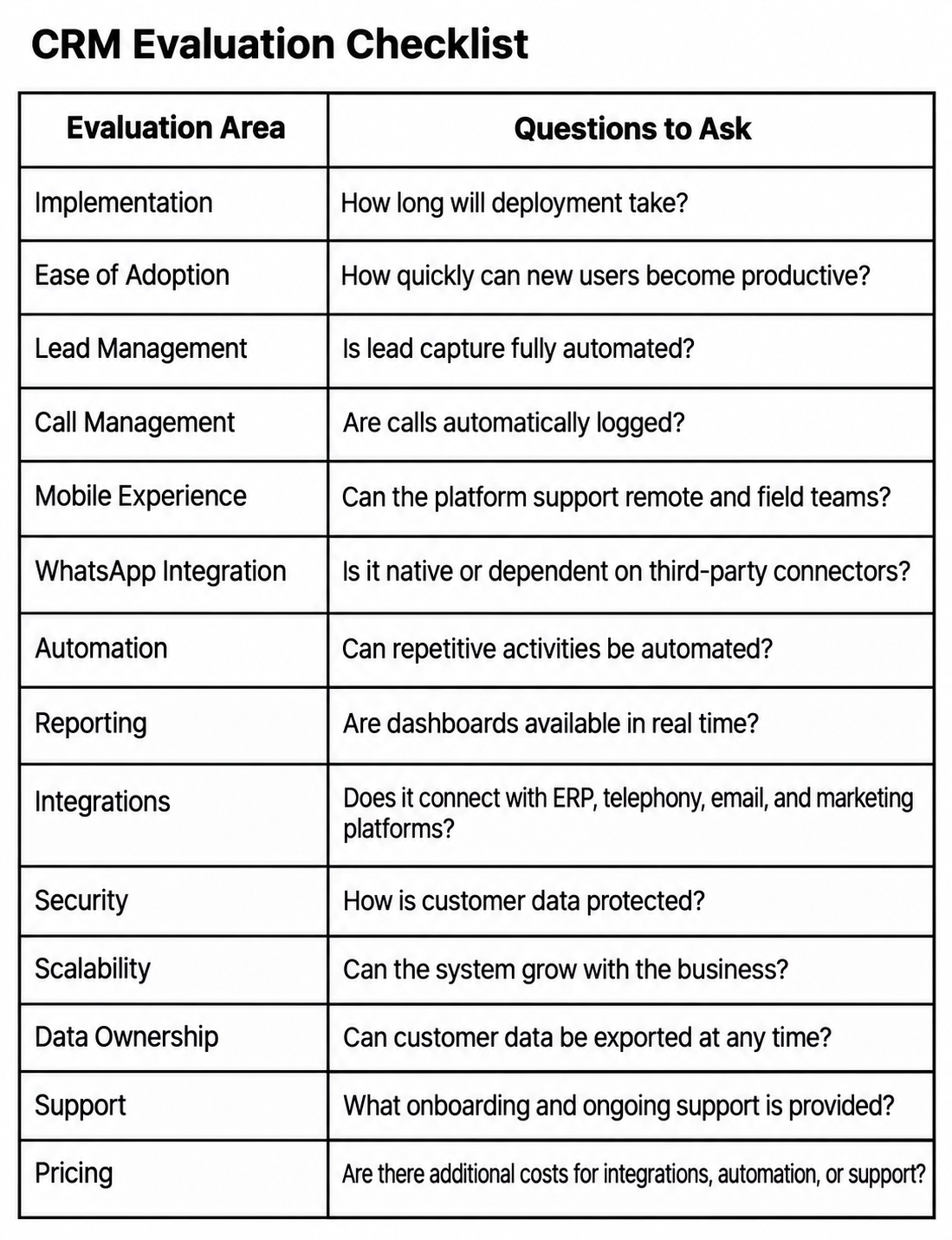
- Questions to Ask Every CRM Vendor
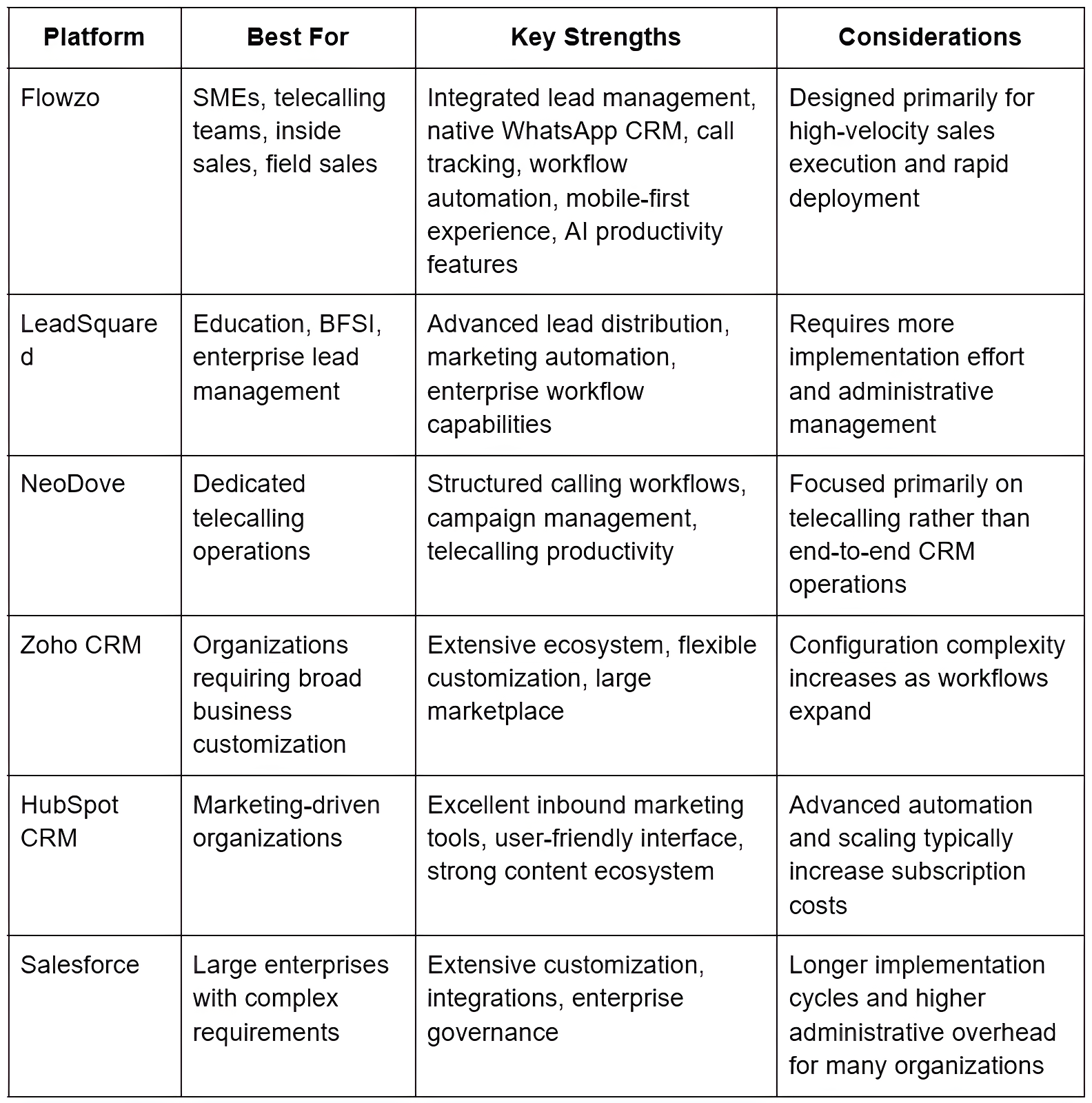
- Vendor Comparison
- Implementation Roadmap
- ROI Framework
- Industry Use Cases
- Frequently Asked Questions
- References
- Technical SEO & Structured Data
The Hidden Cost of Poor Sales Execution
Many organizations assume that increasing marketing budgets is the fastest path to higher sales.
In reality, revenue growth often depends less on generating new leads and more on improving what happens after a lead enters the pipeline.
Every day, businesses invest heavily in digital advertising, SEO, social media campaigns, referral programs, exhibitions, and outbound prospecting. These efforts generate valuable enquiries—but without disciplined follow-up, many of those opportunities quietly disappear.
Common reasons include:
- Leads aren't contacted quickly enough.
- Follow-up reminders are missed.
- Customer conversations are scattered across spreadsheets, notebooks, WhatsApp chats, and personal phones.
- Managers have little visibility into daily sales activity.
- Representatives spend excessive time updating records instead of speaking with customers.
These aren't isolated issues. Together, they create a pattern of inconsistent sales execution that directly impacts conversion rates and revenue predictability.
The Five Biggest Sources of Revenue Leakage
SALES EXECUTION LEAKAGE
1. Delayed First Response
2. Missed Follow-Up Calls
3. Customer Information Spread Across Multiple Tools
4. Limited Visibility Into Sales Activities
5. Excessive Administrative Work
While each issue may seem minor on its own, together they create friction throughout the sales process. The result is a growing pipeline that appears healthy on paper but produces fewer conversions than expected.
The challenge isn't simply generating more leads—it's ensuring that every lead receives timely, consistent, and measurable engagement.
Why Speed-to-Lead Matters
The first interaction often determines whether a prospect continues the conversation or moves on to a competitor.
Sales research from organizations such as Harvard Business Review and MIT has widely examined how response speed affects the likelihood of successfully contacting and qualifying a lead. Rather than treating response time as an administrative metric, leading sales teams treat it as a competitive advantage.
Speed alone, however, is not enough.
A fast initial response followed by inconsistent follow-ups rarely results in a successful sale. Sustainable sales performance depends on maintaining a structured sequence of interactions across calls, WhatsApp, email, and other communication channels until a buying decision is made.
This combination of responsiveness and consistency is what distinguishes high-performing sales organizations from those that rely on individual effort alone.
What Is a Telecalling CRM?
A Telecalling CRM (Customer Relationship Management system) is specialized sales software designed to help businesses manage telephone-based sales activities from a single platform.
It combines lead management, call tracking, follow-up scheduling, customer interaction history, sales pipelines, and reporting into one unified workspace, enabling representatives to spend more time engaging with prospects and less time on manual administration.
Unlike generic CRMs that primarily function as customer databases, a Telecalling CRM is optimized for high-volume daily sales execution.
Its primary objective is straightforward: help sales teams respond faster, follow up consistently, and improve conversion rates through structured workflows.
Core Functions of a Telecalling CRM
A modern Telecalling CRM typically enables teams to:
- Capture leads automatically from websites, Meta Ads, Google Ads, and other sources.
- Assign enquiries instantly to the appropriate sales representative.
- Initiate calls directly from desktop or mobile applications.
- Record call outcomes and maintain a complete customer interaction history.
- Schedule automated reminders for future follow-ups.
- Track opportunities through configurable sales pipelines.
- Integrate conversations across phone calls, WhatsApp, email, and other communication channels.
- Provide managers with real-time visibility into team performance and operational metrics.
By consolidating these activities into a single platform, organizations reduce manual effort, improve accountability, and create a more consistent customer experience.
Who Benefits Most from a Telecalling CRM?
Telecalling CRMs are particularly valuable for organizations that manage large numbers of customer conversations every day, including:
- Inside Sales Teams
- B2B Sales Organizations
- Real Estate Companies
- Educational Institutions
- Financial Services Firms
- Insurance Advisors
- Healthcare Providers
- Manufacturing Companies
- Distribution Businesses
- Retail & E-commerce Sales Teams
- Customer Success Teams
- Business Development Representatives (BDRs)
- SMEs and Growing Enterprises
Regardless of industry, the common requirement is the same: managing a high volume of customer interactions efficiently while ensuring that no opportunity is overlooked.
Telecalling CRM Is About Sales Execution—Not Just Customer Records
Traditional CRM systems were originally designed to organize customer information and support long-term relationship management.
Today's sales environment demands more.
Sales representatives need immediate access to new enquiries, clear follow-up priorities, integrated communication channels, and mobile tools that support work from anywhere. Managers need live dashboards, activity tracking, and measurable performance indicators to coach teams effectively.
A Telecalling CRM addresses these operational needs by turning customer data into actionable workflows.
Instead of functioning as a passive repository of information, it becomes an active sales execution platform—helping organizations improve responsiveness, maintain follow-up discipline, and build predictable revenue processes.
Traditional CRM vs. Telecalling CRM: Understanding the Difference
Many businesses assume that all CRM platforms serve the same purpose. While most CRM solutions help organize customer information, their design philosophy and operational capabilities can differ significantly.
A traditional CRM focuses on storing customer records, tracking opportunities, and generating reports. It often supports multiple departments—including sales, marketing, customer service, and finance—and is designed for broad relationship management across the customer lifecycle.
A Telecalling CRM, by contrast, is purpose-built for high-frequency sales execution. It prioritizes speed-to-lead, structured follow-ups, call management, communication history, and operational efficiency.
For organizations that rely heavily on inside sales, outbound prospecting, or lead qualification, these operational differences have a direct impact on productivity and conversion rates
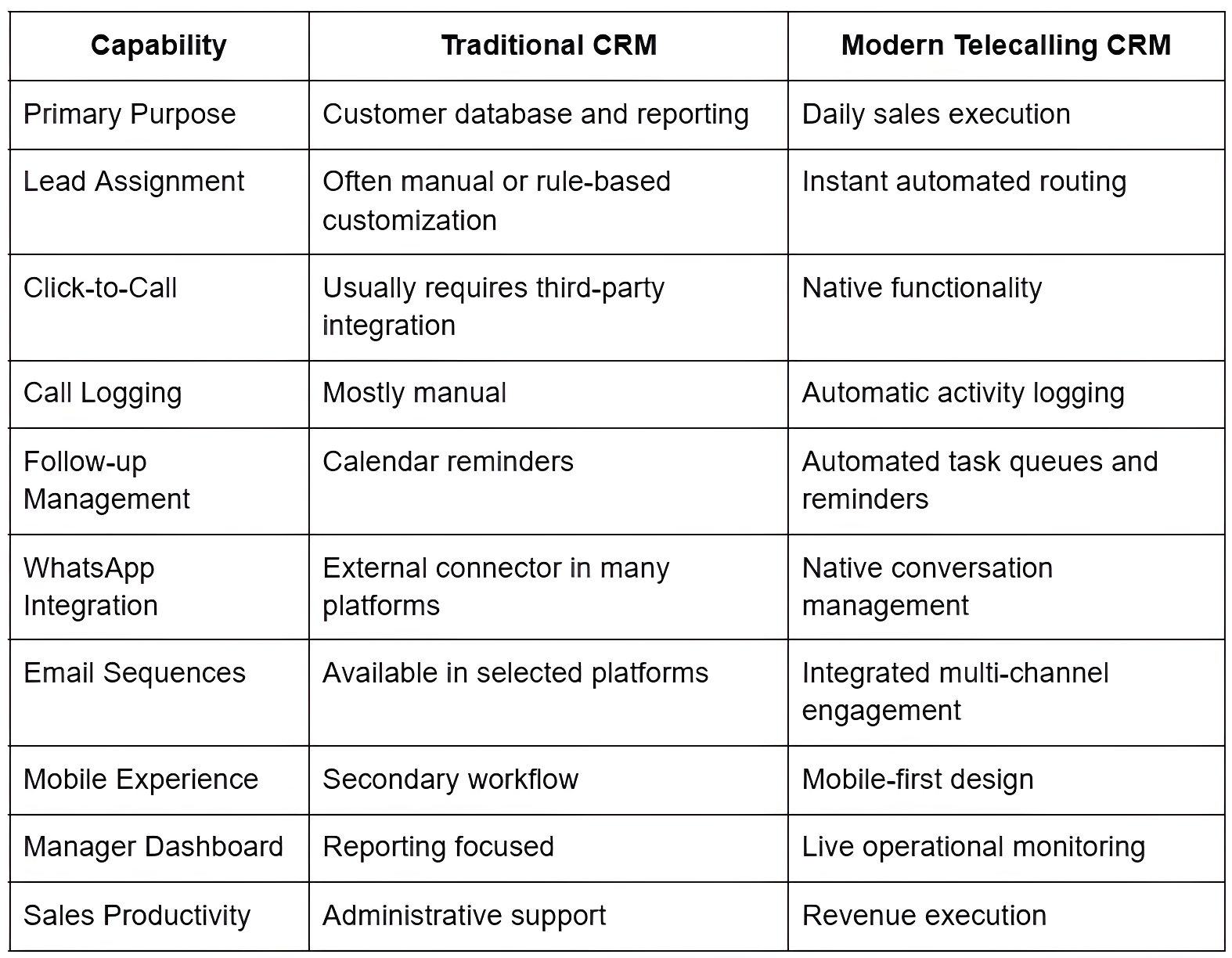
The distinction becomes even more important as sales teams grow. When representatives manage hundreds of customer conversations each week, manually updating records or switching between multiple applications introduces delays, increases administrative effort, and creates opportunities for leads to be overlooked.
The 15 Essential Features Every Telecalling CRM Should Include
Choosing a CRM based solely on price or brand recognition often leads to poor adoption and underutilized software. Instead, organizations should evaluate platforms based on the operational capabilities that directly influence sales execution.
1. Automated Lead Capture Every enquiry from websites, Meta Ads, Google Ads, landing pages, WhatsApp, referral forms, or third-party portals should enter the CRM automatically without manual intervention. Why it matters: Manual data entry slows response times and increases the likelihood of missed opportunities.
2. Intelligent Lead Assignment New enquiries should be distributed automatically based on predefined business rules such as geography, workload, product category, language, or sales representative availability. Why it matters: Instant assignment reduces response times while ensuring balanced workload distribution.
3. Click-to-Call Functionality Representatives should be able to initiate calls directly from customer records without manually dialing numbers. Benefits: Faster calling, reduced dialing errors, improved productivity, better activity tracking.
4. Automatic Call Logging Every customer interaction should be recorded automatically, including call duration, time and date, representative details, call outcome, and follow-up status.
5. Call Recording Management Organizations conducting quality monitoring, compliance reviews, or sales coaching should have centralized access to call recordings. Recorded conversations help managers improve sales coaching, review customer objections, maintain service quality, resolve disputes, and support training initiatives.
6. Follow-up Automation A modern CRM should automatically schedule reminders, create follow-up tasks, notify representatives, escalate overdue activities, and prevent leads from becoming inactive.
7. Visual Sales Pipeline A configurable pipeline (New Lead - Contacted - Qualified - Proposal Sent - Negotiation - Won/Lost) enables better forecasting and earlier intervention when deals begin to stall.
8. Native WhatsApp Integration Conversation history, template messaging, file sharing, automated notifications, and a unified customer timeline, without requiring representatives to switch between multiple applications.
9. Multi-Channel Sales Engagement Coordinating phone calls, WhatsApp, email, SMS, and website enquiries within one centralized workflow.
10. Unified Customer Timeline Every customer profile should display calls, emails, WhatsApp messages, notes, tasks, meetings, and attachments in chronological order.
11. Mobile CRM Access to leads, calls, follow-ups, customer records, notes, pipeline updates, and dashboards from any location.
12. Manager Dashboards Real-time visibility into calls completed, calls connected, follow-ups due, opportunities created, conversion ratios, revenue pipeline, and representative activity.
13. Workflow Automation Automating lead assignment, task creation, reminder notifications, status updates, escalations, approval workflows, and customer notifications.
14. AI-Assisted Sales Productivity Conversation summaries, call transcription, suggested follow-up actions, email drafting, proposal generation, opportunity insights, and activity recommendations. The objective is to reduce administrative effort and improve consistency, not to replace sales representatives.
15. Advanced Reporting & Analytics Lead source performance, campaign ROI, representative productivity, response time analysis, pipeline velocity, conversion rates, revenue forecasting, follow-up compliance, and lost opportunity analysis.
Buyer Decision Framework
Selecting a CRM should align with operational complexity rather than company size alone.
Startups (1–10 Users)
Priorities: Quick implementation, simple interface, affordable pricing, mobile access, automated follow-ups. Avoid: Complex enterprise implementations, heavy customization, long deployment cycles.
Growing SMEs (10–50 Users)
Priorities: Call management, WhatsApp integration, sales automation, dashboards, pipeline visibility, multi-user collaboration, workflow automation. Typical Objective: Standardize the sales process while improving manager visibility and team productivity.
Mid-Market & Enterprise (50+ Users)
Priorities: Advanced permissions, API integrations, ERP connectivity, security controls, compliance, custom workflows, department-wide reporting. Typical Objective: Create a scalable sales execution platform capable of supporting multiple teams and complex business processes.
Implementation Roadmap: A Practical 90-Day CRM Rollout Plan
Successful CRM implementation is less about technology and more about execution.
Phase 1 (Days 1–30): Planning & Foundation
Key Activities: Define sales stages and qualification criteria; document the existing sales process; identify all lead sources; clean duplicate customer records; import existing contacts; configure users and permissions; establish follow-up rules; create standard activity types; configure communication templates; define reporting requirements. Expected Outcome: A structured CRM environment that accurately reflects the organization's sales process, with reliable customer data from day one.
Phase 2 (Days 31–60): User Adoption & Process Optimization
Key Activities: Conduct user training; perform live calling exercises; validate automation rules; review dashboard accuracy; test integrations; monitor response times; gather user feedback; adjust workflows. Expected Outcome: Sales representatives adopt the CRM as part of their daily routine rather than viewing it as extra administrative work.
Phase 3 (Days 61–90): Scale & Continuous Improvement
Key Activities: Deploy to all users; introduce advanced automation; standardize reporting; review sales KPIs; optimize lead routing; measure conversion improvements; identify coaching opportunities; conduct monthly performance reviews. Expected Outcome: The CRM becomes the organization's primary sales execution platform.
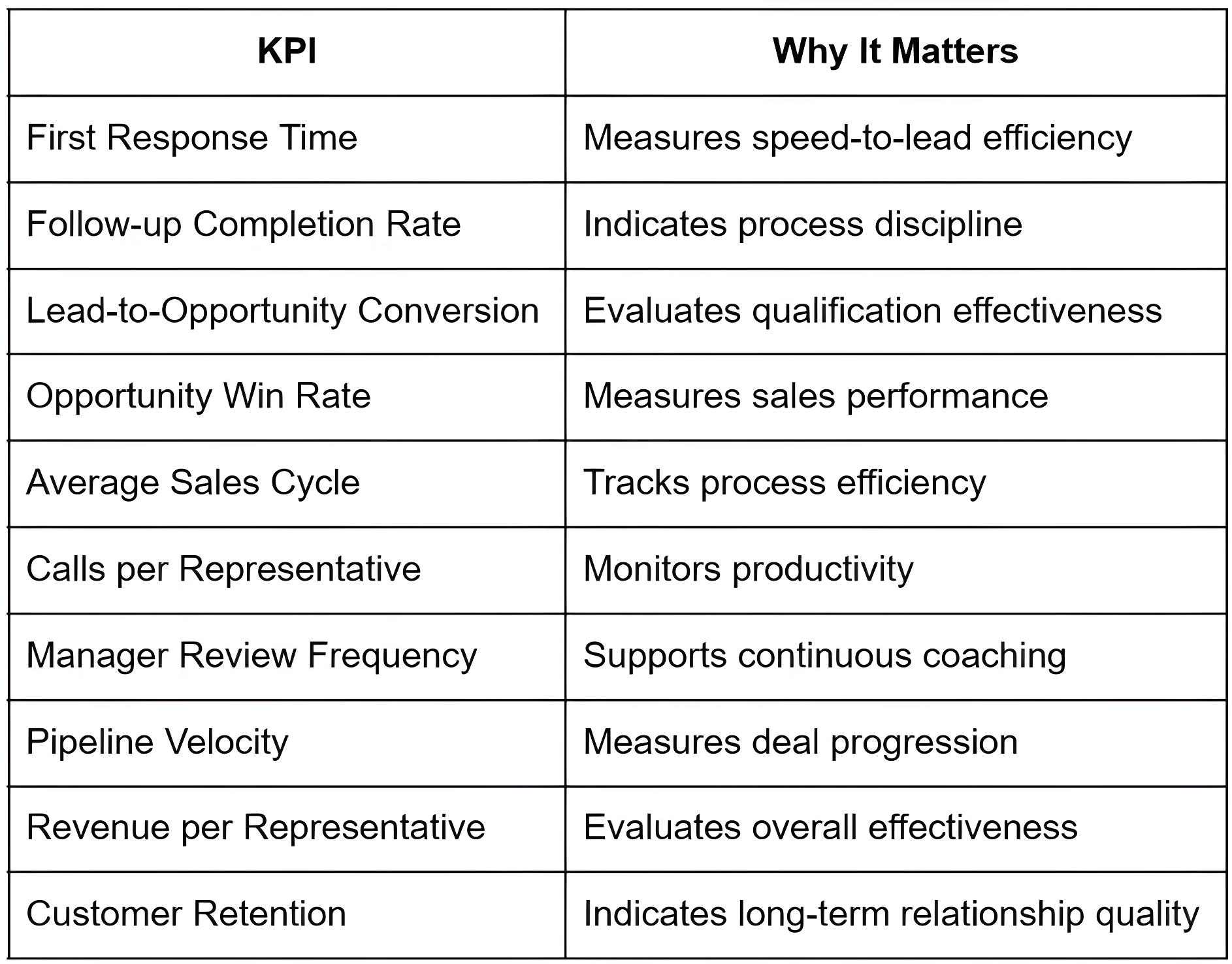
Estimating CRM Return on Investment (ROI)
A CRM delivers measurable value by reducing administrative work, improving follow-up consistency, and increasing conversion opportunities. Rather than focusing solely on software cost, organizations should evaluate the broader operational impact: increased lead conversion, reduced administrative work, improved manager visibility, better forecasting, and a stronger customer experience.
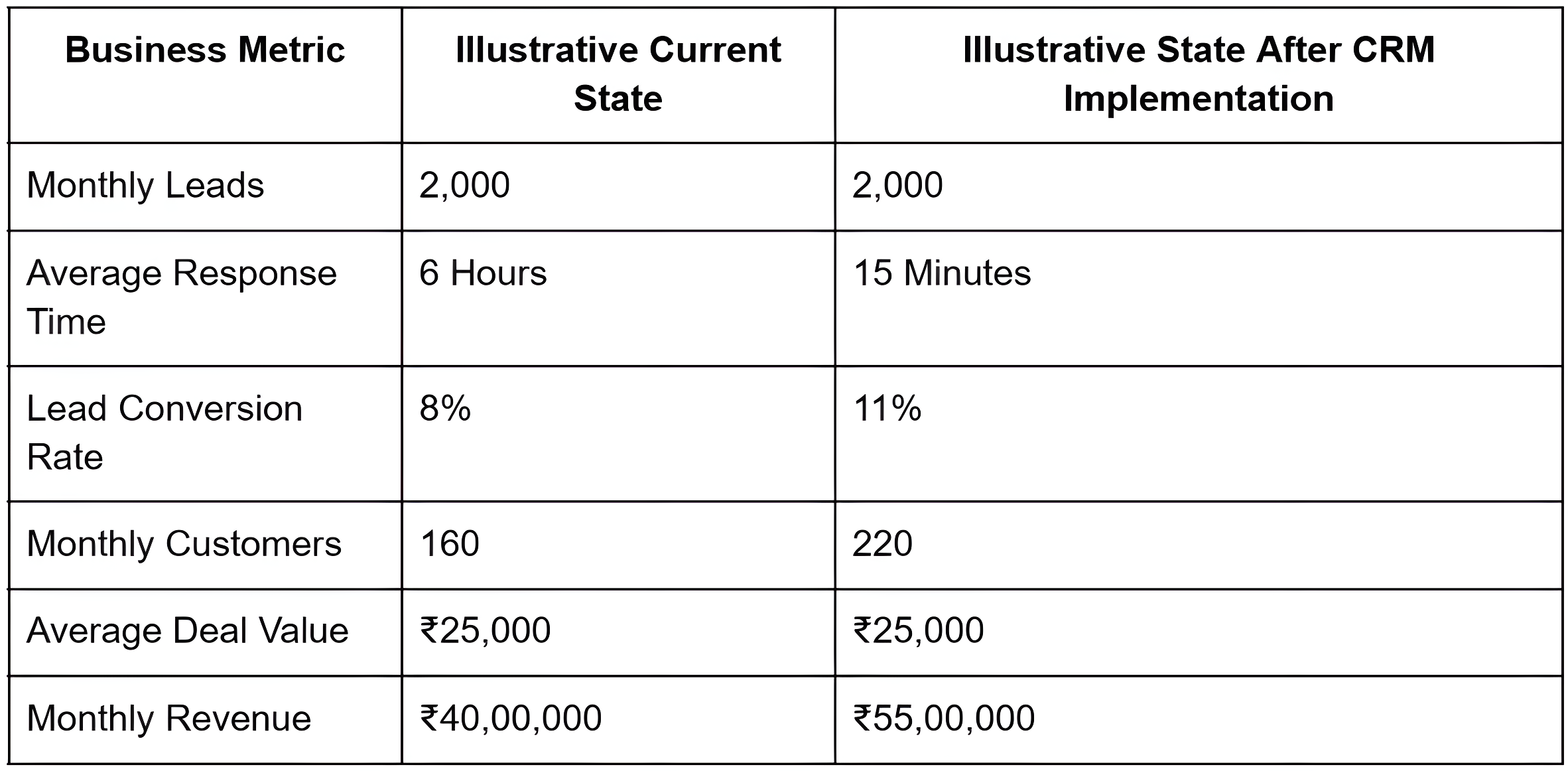
Illustrative ROI Scenario
The example below is illustrative, for planning purposes only. It is not based on a specific customer, and actual results vary by industry, team size, sales process maturity, and lead quality.
Frequently Asked Questions